

By Martyna—aka your Money Saving Girl. I’ve been writing about personal finance for over a decade and have personally tested 50+ money-saving tools to share the best with you!
Amazon changes its prices around 2.5 million times a day. That “deal” you’re looking at right now? There’s a good chance it was cheaper last month.
I’ve been managing money carefully for over a decade, and the simplest habit that’s saved me the most on Amazon is checking the price history before I buy. The free tool I use every single time is CamelCamelCame — and here’s exactly how it works, what I’ve actually saved with it, and where it falls short.
Read my comprehensive camelcamelcamel review to see how it can help you save money on many Amazon products.
Table of Contents
What is camelcamelcamel UK ?
CamelCamelCamel (also called “Camel” or “the Camelizer”) is a free Amazon price tracker. It pulls historical pricing data from Amazon and displays it as a simple chart, so you can see at a glance how the price has moved over time — whether that’s weeks or years.
It’s free, it requires no payment details, and it’s been running long enough to have price histories going back several years on most established products.
It works across multiple Amazon markets including the UK, US, Canada, Australia, Germany, France, Italy, and Spain.
Why you actually need this price check?
Amazon changes product prices roughly every 10 minutes on average. Something listed at £79 today might have been £49 last month — and could drop again next week.
This matters most around big sales events. In the run-up to Prime Day and Black Friday, prices on popular items often creep upwards in the weeks before, so the eventual “discount” looks bigger than it really is. I’ve watched this happen on the same Ninja air fryer two years running. Without price history, you’ve got no way to spot it.
I learned this the hard way. Back in 2022 I bought a set of headphones during a ‘sale,’ only to find on a price tracker they’d been £20 cheaper for most of the previous six months…
How I actually use CamelCamelCamel?
Option 1 — via the website
Go to uk.camelcamelcamel.com, paste in the Amazon product URL or the product name, and hit search. You’ll see a price history graph for Amazon itself plus any third-party marketplace sellers.
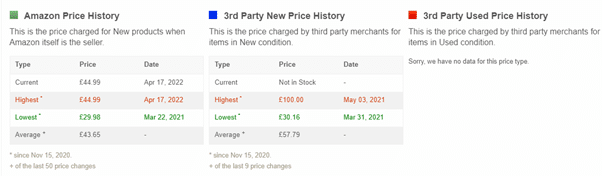
A real example (screenshots shown also below): Back in 2022 I was looking at a”GPS dog tracker” for Luna, it was priced at around £45. The graph immediately showed me it had bounced between £30 and £45 over the previous year, with a recorded low of £30. I had a choice: buy at what was essentially a high point, or set an alert and wait. I set an alert through Camel Camel Camel (see steps further down).
Option 2 — via the browser extension (my preferred method)
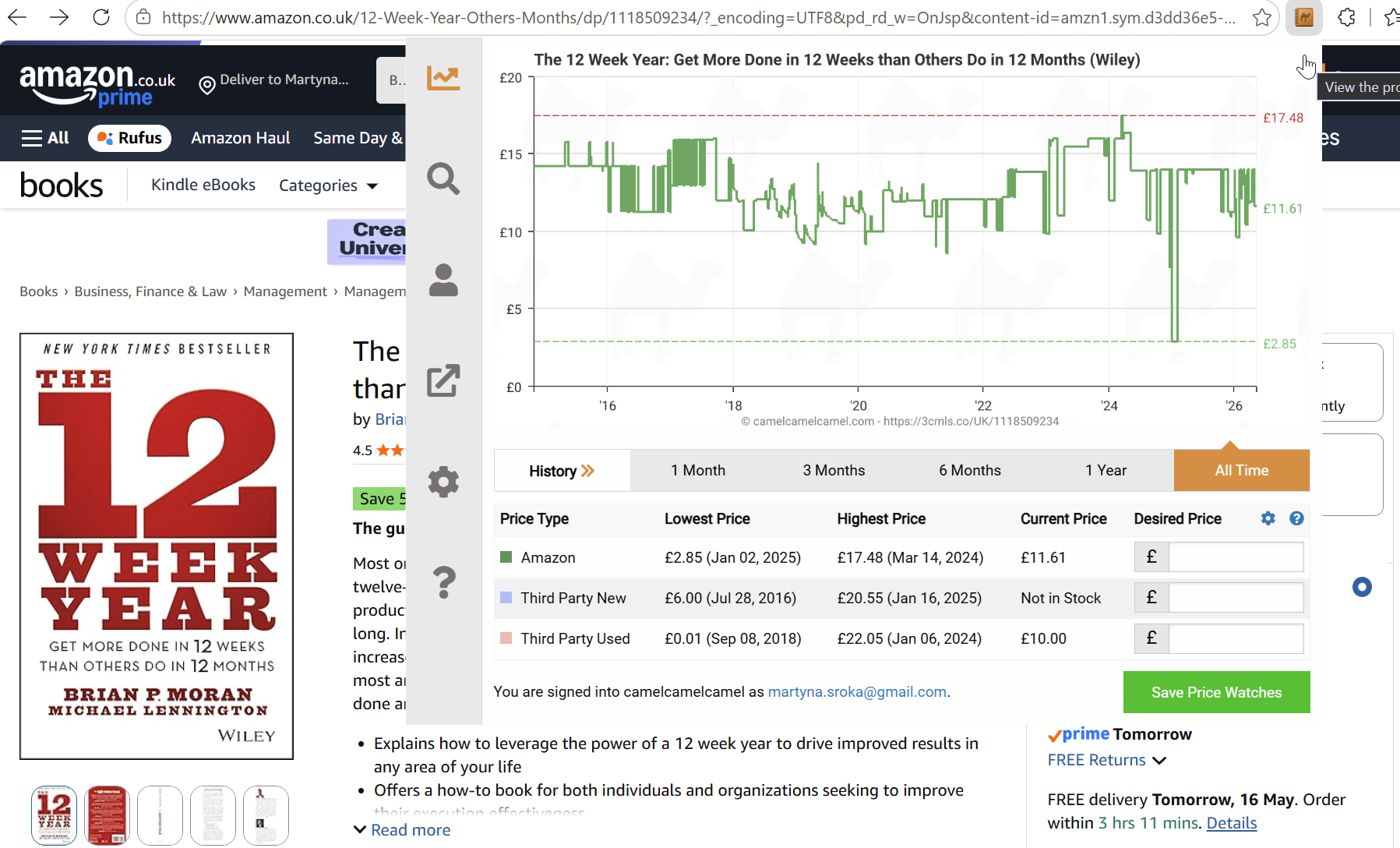
Install the Camelizer extension for Chrome or Firefox, Edge, Opera or Apple Safari. Once installed, a small camel icon appears in your browser bar whenever you’re on an Amazon product page.
Click it, and the full price history pops up without ever leaving Amazon. Three clicks, maybe five seconds. This is the version I use day-to-day when on these browser as normally I use Brave, so when shopping on Amazon I simply switch browsers… This is the option that I’d recommend if you only do one thing after reading this 🙂
Setting up price alerts
This is where CamelCamelCamel goes from informative to genuinely powerful.
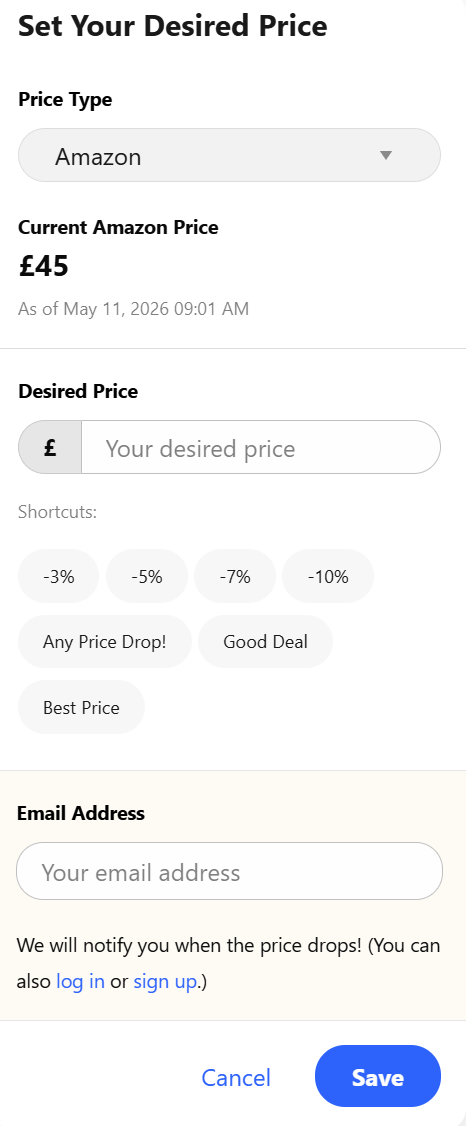
Register for a free account and set price drop alerts on any product. When the price falls to your target, you get an email. RSS alerts are also available if you prefer.
My process:
- Check the historical graph to find the typical low price
- Set my alert slightly above that low (so I don’t miss it if the price only dips briefly)
- Close the tab and stop thinking about it 🙂

It removes the mental load of checking back manually, and it means I’m not impulse-buying at whatever price Amazon happens to show me on a Tuesday afternoon.
Camelcamelcamel features at a glance:
- Price history charts (Amazon and third-party sellers)
- Price drop email alerts
- Availability alerts
- Browser extension (Camelizer)
- The “Camelizer” – browser extension
- Wishlist import
- Optional registration
Unlocking the Power of CamelCamelCamel UK
Step-by-step Guide to Using CamelCamelCamel UK
Using CamelCamelCamel UK is a simple and effective way to track prices and save money on your online purchases. Follow these easy steps to make the most out of this powerful tool:
- Create an Account: Start by setting up an account on CamelCamelCamel UK. This will allow you to save your preferences and track price changes for specific products.
- Track Prices and Set Alerts: Search for the product you’re interested in and click on it to view its pricing history. You can then set up price alerts to be notified when the price drops to your desired level.
- Interpret Pricing Data: Take advantage of the pricing data and graphs provided by CamelCamelCamel UK to make informed purchasing decisions. Look for trends and patterns to determine the best time to buy.
By following these steps, you’ll be able to harness the full potential of CamelCamelCamel UK and save money on your online shopping adventures.
Unlock the Power of CamelCamelCamel UK’s Features
Overview of the Site Layout and Navigation
When you first visit CamelCamelCamel UK, you’ll notice a clean and user-friendly layout that makes it easy to navigate. The homepage provides quick access to search for items and view pricing data, while the menu allows you to explore different categories and features.
How to Search for Items on CamelCamelCamel UK
Searching for items on CamelCamelCamel UK is simple and straightforward. Just enter the name or ASIN of the product you’re interested in tracking, and the tool will provide you with detailed pricing data and historical graphs.

Example:
I wanted to buy a dog tracker and found that this one cost now about £45:
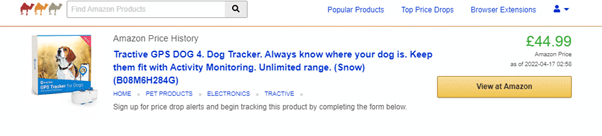
But is that a ‘fair’ price? What was it since the beginning of the time?
Scroll down to see Amazon Price History for this item:

As we can see the price bounced back between £30 and £45 in the last year.
We see that it was the cheapest on 21/3/22 so I shall set up a notification for a price drop if I don’t need this item ASAP and want to test if its price falls:
Overview of the Pricing Data and Graphs Provided by the Tool
CamelCamelCamel UK offers comprehensive pricing data and graphs that allow you to track price history, set price alerts, and make informed purchasing decisions. The graphs provide valuable insights into pricing trends and fluctuations over time.
If you aren’t using a browser extension head to www.camcelcamcelcamel.com and simply type the item name or place Amazon’s product URL in the lookup bar:
That search will present you with historical data on Amazon prices for that item alongside the 3rd party provider’s pricing. The data goes back as far as 1 year (or more).
How it compares to other UK price trackers
CamelCamelCamel is Amazon-only, which is both its strength and its limitation. If you want to compare prices across multiple retailers, you’ll need something else alongside it.
Keepa is the main alternative for Amazon tracking in USA. It offers more granular data and has a browser extension too, but the interface is busier and some features sit behind a paid subscription. If I had to pick one, CamelCamelCamel wins for casual shoppers. Keepa is better if you’re a reseller or buying high-ticket items where £20 of price movement actually matters. Honey (USA): Aside from finding discount codes, Honey also offers a price tracking feature that notifies you when prices drop on items in your watchlist.
PriceSpy and Idealo are what I reach for when I’m not committed to buying from Amazon. Both aggregate prices across multiple UK retailers, which is useful for bigger purchases like appliances or electronics where Amazon isn’t always cheapest.
Google Lens is worth a mention for physical items or when you want a quick multi-retailer price check without setting anything up.
My honest take after years of using these: CamelCamelCamel is the one I open every week because most of my online shopping is on Amazon. The others I use occasionally, but they’re not part of my regular routine.
Pros and cons
Pros
- Completely free
- No technical knowledge needed
- Browser extension makes it frictionless
- Price alerts do the work for you
- Data goes back years on established products
Cons:
- Twitter alert integration was discontinued
- Amazon only — useless outside Amazon
- Some newer or low-volume products have limited price history
When CamelCamelCamel isn’t worth it
I’ll be straight: it’s not for everyone.
If you only shop on Amazon a couple of times a year, the habit probably won’t stick. If you mainly buy fast-moving consumables where prices barely budge (basic groceries, standard household items), the savings are minimal.
It earns its place if you’re buying anything over £30, or if you’re a regular Amazon shopper across the year. For me — someone who buys books and household stuff on Amazon most months — it pays back the 30 seconds of effort many times over.
One more tip: check Amazon Outlet
If CamelCamelCamel shows limited price history on something, or the price isn’t moving, it’s worth checking the Amazon Outlet section for discounted or returned items.
That said — and this matters — Outlet prices aren’t always cheaper than standard Amazon prices. I’ve caught Outlet “deals” that were more expensive than the standard listing in the same week. Always compare before assuming you’re getting a discount.
CamelCamelCamel FAQ
Is CamelCamelCamel safe to use?
Yes. It doesn’t require your Amazon login, doesn’t ask for payment details, and only needs an email if you want price alerts. The browser extension only activates on Amazon product pages.
Is CamelCamelCamel free?
Completely free. There’s no premium tier, no paywall, and no trial period. The site is funded by affiliate links — if you buy through their tracking link, they earn a small commission, but it doesn’t change the price you pay.
Does CamelCamelCamel work on Amazon UK?
Yes. Use uk.camelcamelcamel.com for UK pricing, or just install the Camelizer extension — it automatically detects which Amazon site you’re on.
CamelCamelCamel vs Keepa — which is better?
For most people, CamelCamelCamel. It’s simpler, fully free, and the chart is easier to read at a glance. Keepa wins if you’re a reseller, doing serious arbitrage, or want second-by-second price tracking — but you’ll pay for the advanced features.
Does CamelCamelCamel track Prime Day prices?
Yes, and this is one of the best times to use it. Prices in the weeks leading up to Prime Day often inflate so the eventual “deal” looks bigger. Checking the 6-month history tells you immediately whether a Prime Day price is genuinely low or just theatre.
Why does CamelCamelCamel show “no data” sometimes?
Usually because the product is new to Amazon, has very low sales volume, or was recently relisted with a new ASIN. In those cases, set an alert anyway — data will build up over time — or check Keepa as a backup.
Is Camelcamelcamel just for Amazon?
Yes, the main difference is that Camelcamelcamel scrapes historical prices only from Amazon whereas sites such as Idealo or Pricespy scrape the web to find historical prices also outside of Amazon.
I hope this post helps you understand how to find the lowest price on Amazon and that thanks to the Camelizer or any other notifications you will be able to secure the best Amazon deals.
If for some reason the price monitoring sites/extension fail you (they don’t work or seem to be inaccurate) head to the Amazon outlet. However, beware oftentimes items in the Outlet may not be cheaper than regular items elsewhere on Amazon. As always check before you buy.
My verdict
CamelCamelCamel is one of the few tools I’d call essential for anyone shopping on Amazon regularly. It takes five seconds to use, it’s free, and it consistently stops me from overpaying.
The browser extension is the version I’d recommend. Install it once and it becomes a habit that pays for itself the first time it talks you out of a bad-timing purchase.
If you’re spending real money on Amazon — electronics, books, household items, anything — knowing the price history before you buy is just basic due diligence. CamelCamelCamel makes that effortless.
If you found this post useful, you might also like my guide to best UK cashback site: or to a post on saving 70% on grocery bill.
Copy refreshed on 15/05/2026 – originally written on 01/04/23.